
ECM Post Purchase Upsell
Rebuilt
Shows one more product after payment, added to the paid order in one click.
Install on ShopifyGet help with ECM Post Purchase Upsell
- Price
- Free
- Shopify App Store, Nov 2026
- Listed
- Since Jul 2019
- Shopify App Store, Nov 2026
Last minute offer especially for you!
The deal ends after you leave this page, so don't miss your chance!
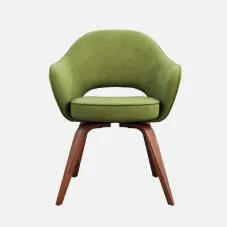
Olive armchair
$53.00 $48.00
Subtotal$48.00
ShippingFree
TaxesFree
Total$48.00
Pay now
Decline offer
Offer surface
Post Purchase
Thank you page
Offer discount
Fixed amount
Discount amount$5.00
Downsell offer after decline
Shown only if the buyer declines the upsell.
History
- Jul 15, 2019Launched
- Summer 2026Joined Ecemmerce
- Autumn 2026New version
What it does
The app shows a buyer one more product after they have paid. On the Post Purchase page they add it to the order they just paid in one click; where that page is not available, the offer can show on the Thank you or Order status page.
One click after payment
On the Post Purchase page the buyer taps Pay now and the product joins the order they already paid. Where that page is not available, the offer can show on the Thank you or Order status page.
Shown after the right order
Each offer has one trigger: Always, Purchased product or Minimum order value. Then you pick the product, its variant and the quantity.
Full price, free or a discount
No discount by default. You can also make it free, take a percentage off or take a fixed amount off, and write the text the buyer sees.
See whether it works
Views, accepted offers, conversion rate and revenue, in total and for each offer. Where a number cannot be counted reliably, you see a dash.
Sample store data
How to set it up
Enable Post Purchase in Shopify checkout settings
Home shows the activation status of each surface and links to the settings Shopify asks you to change.
Create and publish your first offer
Pick the surface, the trigger, the product and the incentive, fill in the text, open the preview and publish.
Confirm your offer is live
Follow each offer's status in the offers list on Home. Where Shopify lets the app see why an offer was not shown, Home says so.
The details
No second checkout
On the Post Purchase page the product joins the paid order. On the other two pages accepting is a separate flow.
Three places to show it
The Post Purchase page, the Thank you page and the Order status page, each activated in Shopify.
A preview for each page
Open the preview for the surface you chose before you publish.
A status for each offer
Active, Paused or Draft, in the offers list on Home.
A dash, not a guess
A number the app cannot count reliably is shown as a dash.
One trigger per offer
Every buyer, orders that include one of the products you choose, or orders at or above an amount you set.
A second offer after a decline
On the Post Purchase page you can add a downsell offer that shows when the buyer declines the first.
Buyers choose the variant
Set a specific variant, or let buyers choose from the product's options.
Sold-out offers stay hidden
An offer whose product is sold out is not shown to buyers.
Plans
As listed on the Shopify App Store, Nov 2026.
Questions
Does the buyer have to check out a second time?
Not on the Native Post Purchase page: the buyer taps Pay now and the product joins the order they already paid. On the Thank You page (Claim offer) and the Order Status page (Add to order), accepting is a different flow and is not one click.
Why is my offer not showing?
Some surfaces have to be activated in Shopify before an offer can show there. Home shows the activation status of each surface and the status of each offer, and says why an offer was not shown wherever Shopify lets the app see the reason.
Can I show an offer only after certain purchases?
Yes. Each offer has one trigger: Always, Purchased product (one of the products you choose) or Minimum order value.
What discount can an offer carry?
None by default, so the product sells at its full price. You can also make it free, take a percentage off or take a fixed amount off, and the choice is made for each offer.
How do I see whether an offer is working?
Home shows views, accepted offers, conversion rate and the revenue the offers brought in, in total and for each offer. Where a number cannot be counted reliably, Home shows a dash instead of a figure.
I installed the app before. Do I have the new version?
The new version serves new installs. We move stores that installed the app earlier to it, and their offers, settings and results come with them.
Install

ECM Post Purchase Upsell
Shows one more product after payment, added to the paid order in one click.

